Accept Terms
Accept Apple Developer Program Terms
Whenever Apple updates the Apple Developer Program License Agreement, the Account Holder must review and accept the new terms before continuing to use developer services.
This step is mandatory and applies each time the terms and conditions are updated, regardless of when the account was originally created.
Steps to Accept the Terms & Conditions
- Sign in to the Apple Developer Portal using the Apple ID associated with your developer account.
- If there are pending agreements, a notification banner or dialog will be displayed.
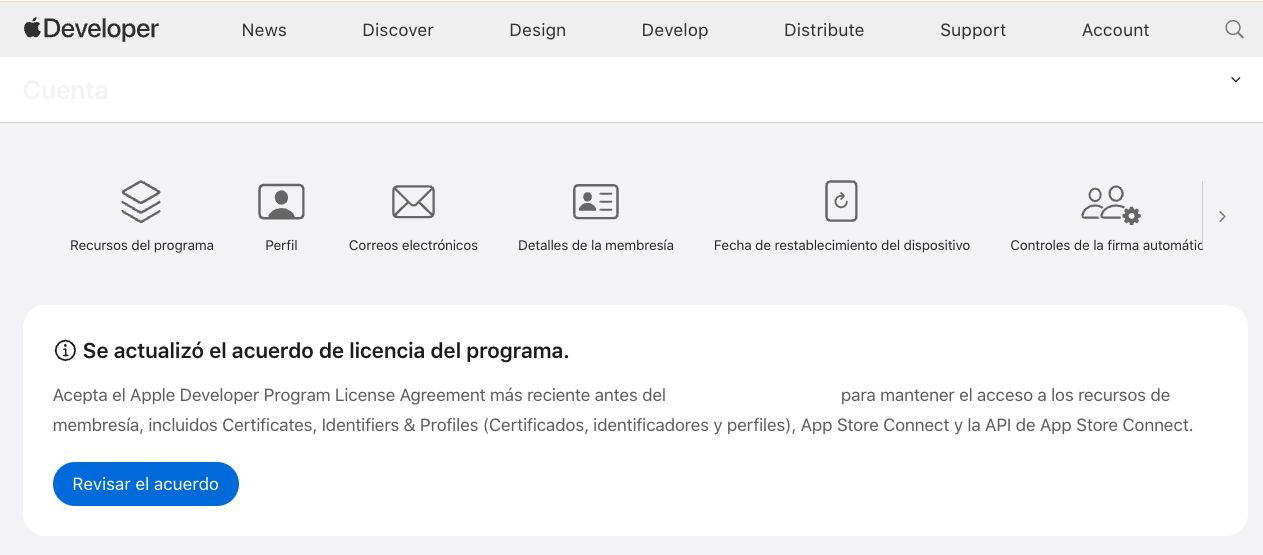
- Click the blue confirmation button to review the updated terms.
- Read the Apple Developer Program License Agreement carefully.
- Accept the terms and conditions to complete the process.
Important Notes
- Until the terms are accepted, access to App Store Connect, certificates, identifiers, and provisioning profiles may be restricted.
- Only the Account Holder has permission to accept or reject legal agreements.
- This step may need to be repeated periodically when Apple updates its agreements.